Language: Português (BR) · Español
Live races: scoreboard, clues and updates in almost real time
During the race, athletes and the public follow the rankings, stages and latest synchronizations via match kiosk — without waiting for a spreadsheet at the end of the day.
provas ao vivo tiro prático resultados ao vivo IPSC placar prova tiro match scoring services kiosk resultados
List of evidence
Filter IPSC/IDPA and search by name.
Quick actions
Jump straight to import tools and related guides.
What you get on this page
- List of active matches in /matches.
- Test hub: division, squads, verify, agreed.
- JSON and Smart Refresh APIs for screens and integrations.
Quick summary
- List of active matches in /matches.
- Test hub: division, squads, verify, agreed.
- JSON and Smart Refresh APIs for screens and integrations.
- See the sections below and the shortcuts to apply to your test or transmission.
How we stream with OBS Studio
Step-by-step workflow: match data in Scoring Services, overlay in OBS Studio (Browser Source), and live scoreboard for the audience.
System (live scoreboard and competition)
OBS Studio (how we do it in practice)
1) Generate overlay URL
In the active test: /match/{id}/config/overlay → choose track → copy URL.
Open evidence2) Browser Source in OBS
Browser font, 1920×1080, mark transparent background; no extra Custom CSS.
Overlay guideOn live broadcast
Analysis Tools
Comparisons, PDF and chronograph in the same ecosystem.
/ferramentas-analise-tiro-praticoVideo example: streaming with OBS Studio
Real recording of our live setup — Scoring Services scoreboard on screen, transparent OBS overlay, and athletes following along at m.scoring.services.
Real example: how we broadcast the test with OBS Studio
Example recording of our live broadcast: score and last shots from Scoring Services on screen, transparent overlay added in OBS Studio as Browser Source, while athletes follow the same race at https://m.scoring.services/ and /matches. The same flow applies to vMix, Streamlabs and other web source programs.

- Placar e resultados vêm do Scoring Services (dados da prova ao vivo ou PractiScore).
- No OBS Studio: Browser Source com a URL do overlay, fundo transparente, 1920×1080.
- Na live: leaderboard e faixa de último tiro; no estande: m.scoring.services no celular.
How the match kiosk works
Scoring software (e.g. Shooting House) sends data to POST /update_match_data; the site persists JSON and displays it in /match/{uuid}. Flags control squads, verify and combined. sync_time indicates last update — pages use Smart Refresh to reload when there is a change.
What do you see on each screen
Main page of the race: links to division, tracks, squads, athlete verification and combined (if enabled). By track: ranking on stage. Totals: summary with percentage. Charts: Chart.js in the test itself (/match/{id}/graphs).
Integrations and external screens
GET /match/{id}/json returns gzip snapshot with cache. GET /match/{id}/last_update for lightweight polling. Ideal for club screens and companion apps. Technical documentation on cloud.md §9.
Imported vs live tests
Live: match kiosk. After the test, many steps also enter the import hub (/imported_matches) for historical and comparative analysis — two complementary paths.
m.scoring.services — tests transmitted on cell phones
Every test configured for live public viewing appears on the kiosk. On the smartphone, https://m.scoring.services/ offers scores, divisions and periodic updates at the stand; on desktop, use /matches. After closing, dive into the IM hub or /imported_matches. When broadcasting with OBS Studio, the same data feeds the live overlay — there is a real example video on this page (section “Video example: broadcast with OBS Studio”).
Live and imported tests
Same test selector used in the kiosk and hub — includes PractiScore and WinMSS sources.
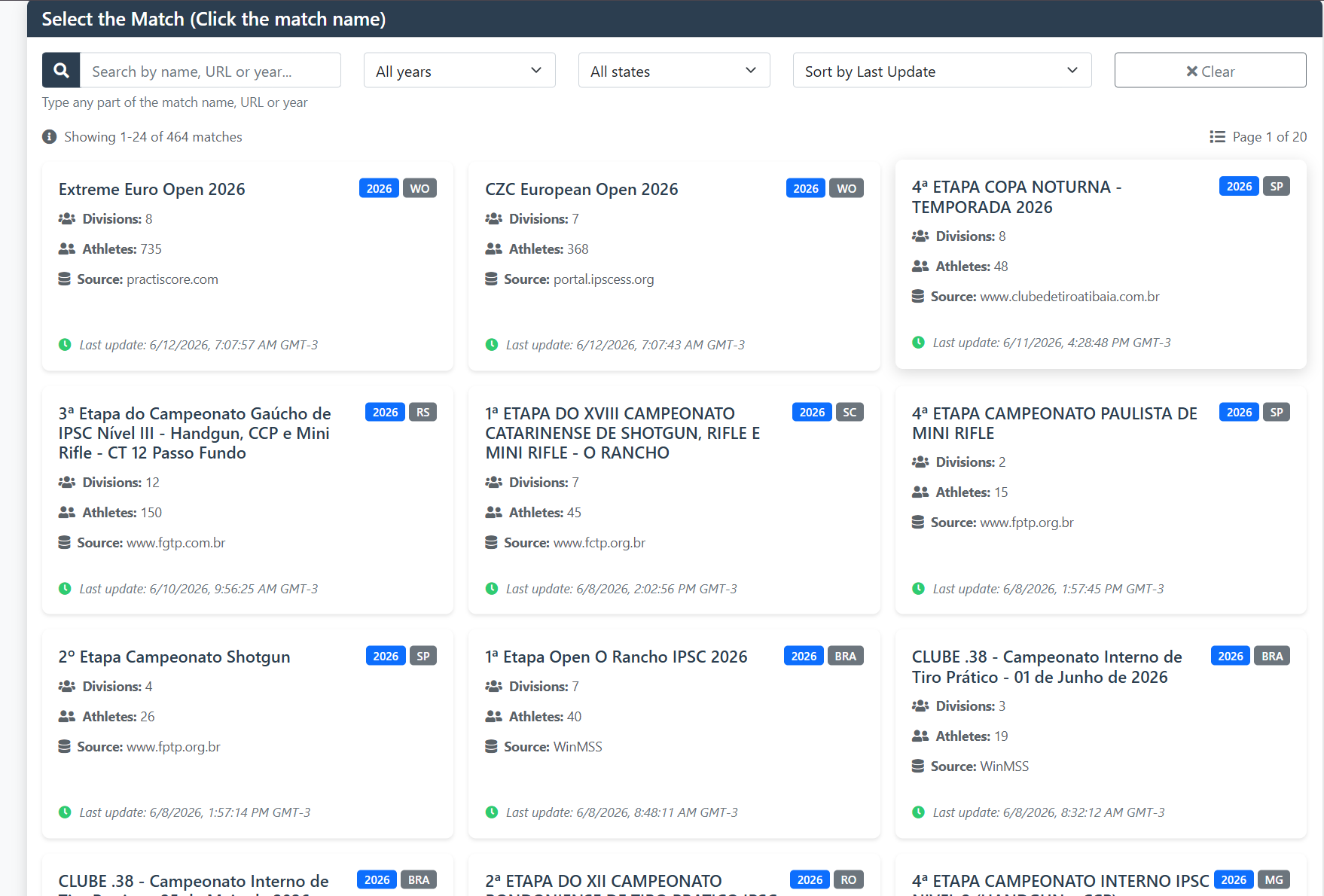
Live and imported tests
Same test selector used in the kiosk and hub — includes PractiScore and WinMSS sources.
Live and imported tests
Same test selector used in the kiosk and hub — includes PractiScore and WinMSS sources.
Live and imported tests
Same test selector used in the kiosk and hub — includes PractiScore and WinMSS sources.
Tools on the IM hub
Direct links to im.scoring.services — match list, import, athlete search, editors, and more.
All hub features
Each card opens a dedicated area of the import and analysis hub.
More practical shooting & IPSC guides
Frequently asked questions
Apoiadores


