Language: Português (BR) · Español
IPSC Stage Designer: draw IPSC stages in your browser
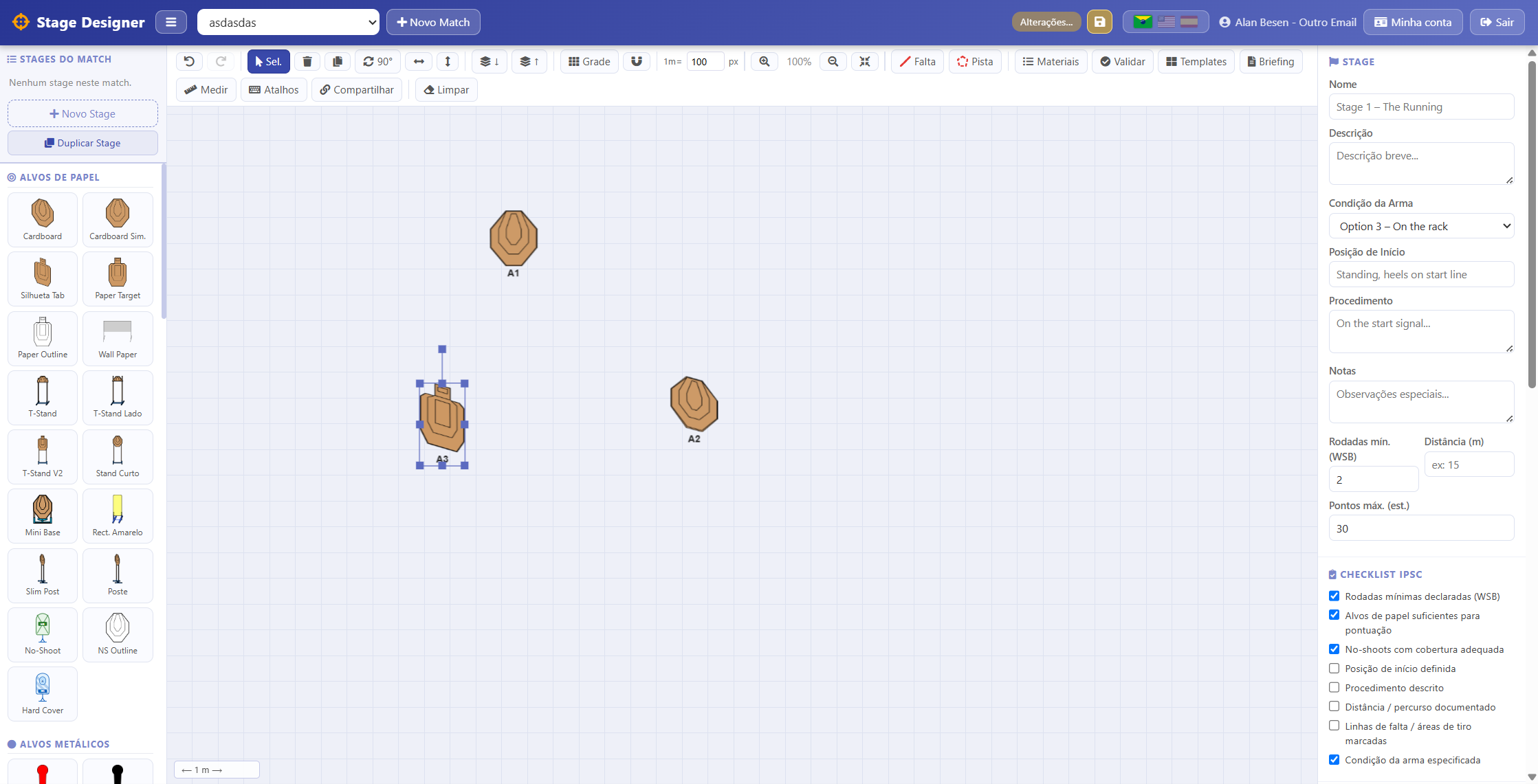
The IPSC Stage Designer is the Scoring Services web app for creating stage layouts in the browser — a canvas with targets, steel, props, and barricades, WSB checklist, automatic validation, briefing, PDF export, materials list, and read-only links to share with Range Officers and squads. Built for Match Directors, stage designers, and clubs that reuse formats across matches. The tool lives at stages.scoring.services; this landing on scoring.services explains how to use it and how it connects to Athlete Training.
IPSC Stage Designer desenhar pista IPSC designer de stage briefing RO PDF stage WSB treino do atleta
Open the IPSC Stage Designer
Create a match, draw stages on the canvas, validate WSB, and export PDF or a read-only RO link — all in the browser with your Scoring Services account.
Free · Scoring Services SSO · 100% web
Atalhos destacados
Ferramentas no hub IM ou páginas relacionadas deste guia.
O que você encontra nesta página
- Interactive canvas with IPSC target library, steel, props, fault lines, and polygons.
- WSB checklist, shot and No-Shoot validation, automatic Short/Medium/Long classification.
- RO briefing, PDF for a stage or full match, and materials list with target counts.
- Read-only link for squad and RO; templates and stage duplication across matches.
- Athlete Training integration — link a layout and carry targets/round counts into training sessions.
Resumo para decisão rápida
- Open https://stages.scoring.services/stages — Scoring Services SSO login (free active account).
- 100% web: no install; works on desktop and tablet.
- Evolving feature — does not replace official federation drawings, but speeds planning and briefing.
- Docs on the hub: https://im.scoring.services/docs (Stage Designer section).
What the IPSC Stage Designer is
It is the web app for drawing IPSC stages in the browser: place paper and steel targets, barricades, fault lines, and area polygons on a canvas with grid, snap, zoom, and meter ruler. Create matches with multiple stages, fill WSB data (name, procedure, start position, minimum rounds), run automatic validation, and export briefing or PDF for RO and squad.
Who it is for
Match Directors and stage designers planning layouts before a match; Range Officers reviewing briefing and fault areas; clubs reusing drills or formats across events. It also complements Athlete Training: after drawing, use Link to Training to push calculated targets and round counts into training sessions — see /treino-do-atleta-ipsc.
How it works (step by step)
1) Sign in with Scoring Services SSO at https://stages.scoring.services/stages 2) Select or create a match at the top. 3) Add stages and drag targets from the sidebar onto the canvas. 4) Fill WSB (name, procedure, start, minimum rounds). 5) Draw fault lines, walls, and polygons (shortcuts F, A, P). 6) Click Validate to check shots, No-Shoots, and start area. 7) Use Materials for the props list; Briefing for RO-ready text. 8) Export PDF or generate a read-only link. 9) Save as template for future matches.
Validation, materials, and PDF
Automatic validation helps catch shot, No-Shoot, and start-position issues before briefing. The materials list counts targets and rounds by type. Export PDF for the current stage, the full match, or a summary — useful for match files, squad walkthroughs, and range-team communication.
Share with RO and squad
Generate a read-only link with canvas, full briefing, and WSB data. Range Officers and athletes view without editing — ideal for pre-match alignment and remote review. The link complements PDF when you want a centrally updated view in your Scoring Services account.
Stage Designer vs official drawings
The feature is evolving and does not replace official federation drawings or your club workflow. Use it to plan layouts, training, internal briefings, and squad communication. For results and post-match analysis, combine with /import-match-ipsc and the hub at im.scoring.services.
Continue in the Scoring Services ecosystem
Linked training: /treino-do-atleta-ipsc. Analysis tools: /ferramentas-analise-tiro-pratico. Improve with match data: /como-melhorar-ipsc. Full index: /guia-ipsc.
IPSC Stage Designer
Draw stages in the browser: target library, WSB checklist, and RO briefing.
Ferramentas no hub IM
Atalhos diretos para im.scoring.services (lista de provas, importação, busca de atleta, editores e mais).
Todas as funções do hub
Resumo em cards: cada botão leva a uma área específica do IM.
Division statistics
Compare averages and distributions within the same IPSC division.
Athletes by divisionPlatform statistics
Distribution by division, state, match level and macro view of imported data.
Open platform statsIPSC Stage Designer
Draw stages in the browser — WSB, PDF, materials and RO link.
Open Stage DesignerExplore também no guia IPSC
Perguntas frequentes
Apoiadores


