Language: Português (BR) · Español
IPSC results and division editor, free and in the browser
The results editor is one of the most important tools on Scoring Services: match directors, technical teams, and athletes can review a match, fix data, simulate division and power factor (major/minor) scenarios, and instantly see the impact on the combined and the ranking — all in the browser, with nothing to install. This page explains what it does, how to use it, and why it is a modern alternative to the PractiScore Competitor flow for post-match work.
editor de resultados ipsc editor de divisão ipsc simular fator ipsc major minor practiscore competitor validação pós-prova
Open the results editor
Validate the match, fix data, simulate division and power factor, and see the ranking impact — in the browser, for free.
Free · 100% web · login only to save
Quick actions
Jump straight to import tools and related guides.
What you get on this page
- Results and division editing — 100% web, free, and install-free.
- Simulate division and power factor (major/minor) with instant ranking impact.
- Post-match validation for organizers and technical teams, with a public link to share.
- Integrated with the hub: charts, combined, heatmaps, and athlete search on the same match.
- Imports ShootingHouse (URL) and WinMSS (.cab) matches before you edit.
Quick summary
- Open the editor at https://im.scoring.services/editor
- Use it to simulate scenarios and validate the ranking before you make it official.
- Functional comparison with PractiScore in the docs: https://im.scoring.services/docs#comparativo-editor-practiscore
- Login may be required to save; public lookup stays free.
What the results editor is
It is the Scoring Services web tool for reviewing and adjusting an IPSC match after scoring: fix athlete data, change division, change power factor (major/minor), and immediately see how each change affects the combined, the percentage, and the ranking. Unlike a static spreadsheet, everything is interactive and stays connected to the match hub (charts, heatmaps, combined). Open it at https://im.scoring.services/editor
How to use it (step by step)
1) Import the match via ShootingHouse (URL) or WinMSS (.cab), or pick an existing one. 2) Open the editor at https://im.scoring.services/editor 3) Adjust division, power factor, or fix athlete data. 4) Watch the ranking and combined update in real time. 5) Save (login may be required) and share the hub link with your team and athletes.
Decision-oriented division and factor simulation
The key advantage is simulation: change an athlete’s division or a firearm’s power factor and instantly see the ranking reorganize, without affecting the official data until you save. This helps validate reclassifications, check ties, and understand the effect of major/minor on hit factor and percentages. Go deeper in /importar-prova-ipsc and /hub-completo-da-prova.
Scoring Services editor vs PractiScore Competitor
PractiScore (and the PractiScore Competitor app) is strong at collecting scores and at competitor registration/lookup. The Scoring Services editor focuses on post-match: editing and simulating results in the browser, with rich analysis and a public link to share. They are complementary — you can score in PractiScore and publish, edit, and analyze here. See the table below and the functional comparison at https://im.scoring.services/docs#comparativo-editor-practiscore
Who should use it
Match directors and technical teams post-match, to validate and simulate division scenarios before making results official. Athletes who want to understand placement can start with the match hub and comparison views, and still benefit from seeing the impact of a correction. Login may be required to save; public lookup stays free — see /free-ipsc-results-no-login.
Continue across the Scoring Services ecosystem
Import a match: /import-match-ipsc. Complete match hub: /match-hub-ipsc. Live leaderboard and broadcast from PractiScore: /practiscore-integration-ipsc. Free public results: /free-ipsc-results-no-login.
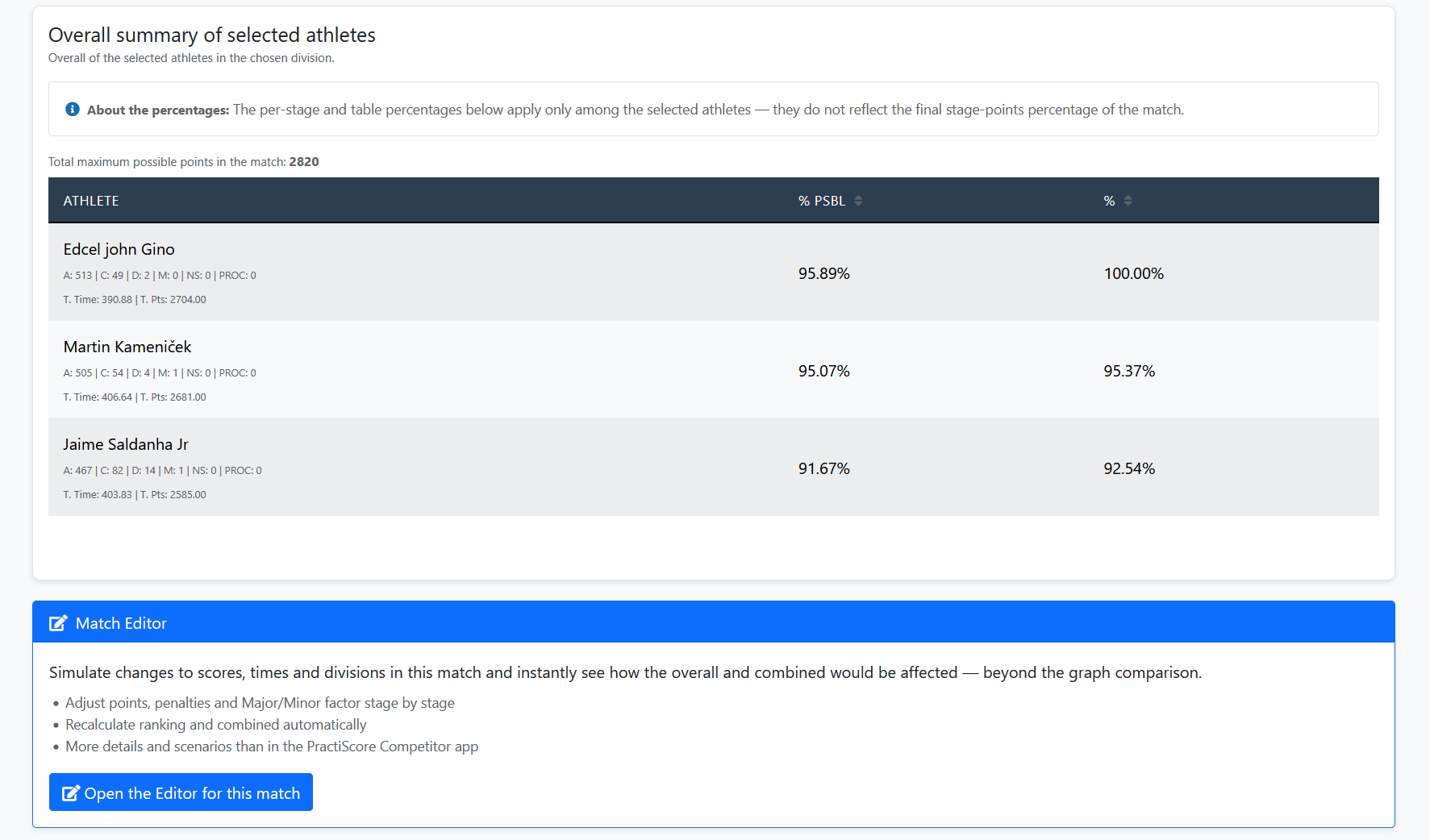
Match Editor — simulate scenarios
Adjust scores, times, and divisions on the imported match and see overall and combined impact instantly.
Scoring Services editor × PractiScore Competitor
| Scoring Services editor | PractiScore Competitor | |
|---|---|---|
| Access | Web, no install | App (iOS/Android) and PractiScore desktop |
| Main focus | Post-match editing and simulation | Competitor registration and results lookup |
| Simulate division/factor and see ranking impact | Yes, in real time | Not the app’s purpose |
| Edit results/divisions in the browser | Yes | Editing stays in scoring (tablet/desktop) |
| Rich analysis (charts, heatmap, combined, ELO) | Yes, in the match hub | Results as a list |
| Share a public match link | Yes | Via app/account |
| Imports ShootingHouse and WinMSS | Yes | — |
| Languages | Portuguese and English | English (primary) |
| Cost | Free | Free app; ecosystem features vary |
Tools on the IM hub
Direct links to im.scoring.services — match list, import, athlete search, editors, and more.
All hub features
Each card opens a dedicated area of the import and analysis hub.
Division statistics
Compare averages and distributions within the same IPSC division.
Athletes by divisionPlatform statistics
Distribution by division, state, match level and macro view of imported data.
Open platform statsIPSC Stage Designer
Draw stages in the browser — WSB, PDF, materials and RO link.
Open Stage DesignerExplore more in the IPSC guide
Frequently asked questions
Apoiadores


