Language: Português (BR) · Español
IPSC combined results for technical diagnosis
Use the combination to see the complete performance of the test in a single table and identify where each adjustment generates the most return.
resultados combinados ipsc acertos e penalidades ipsc combinado prova
View combined in IM hub
In the selected event, open the combined view for the complete table by athlete and by stage.
Quick actions
Jump straight to import tools and related guides.
What you get on this page
- Complete table by athlete and stage.
- Reading hits and penalties with context.
- Objective basis for adjusting training plan.
Quick summary
- Complete table by athlete and stage.
- Reading hits and penalties with context.
- Objective basis for adjusting training plan.
- See the sections below and the shortcuts to apply to your test or transmission.
Full reading of what happened in the test
In the combined, you see all the tracks (stages) together: sum of points, times, penalties and, when available, percentage in relation to the best in the division in each stage — which explains jumps or drops in the overall.
Decision-focused hits and penalties
Reading hits A, C and D and penalties M (miss), NS (did not shoot) and PROC (procedure) helps to separate shooting execution errors, route planning errors and the normal “noise” of a long race; in the largest and smallest factor the weight of C and D changes, so always cross with the division and type of factor of the step.
From results to training
With this in mind, it becomes easier to create goals based on impact: reduce penalties, improve consistency and increase the total percentage.
Continue in the Scoring Services ecosystem
This article is part of /guia-ipsc. To apply it in practice, open a test at https://im.scoring.services/list or follow the steps at /matches. Recreational athletes can start with the comprehensive guide at /tiro-practico-guide-completo.
Useful links after the deal
Compare athletes at /comparativo-atletas-ipsc or /comparacao. Penalties: /hits-e-penalties-ipsc. Live match: /matches.
Combined results
Complete table with athletes, division, hits, time, % and points — consolidated view of the race.
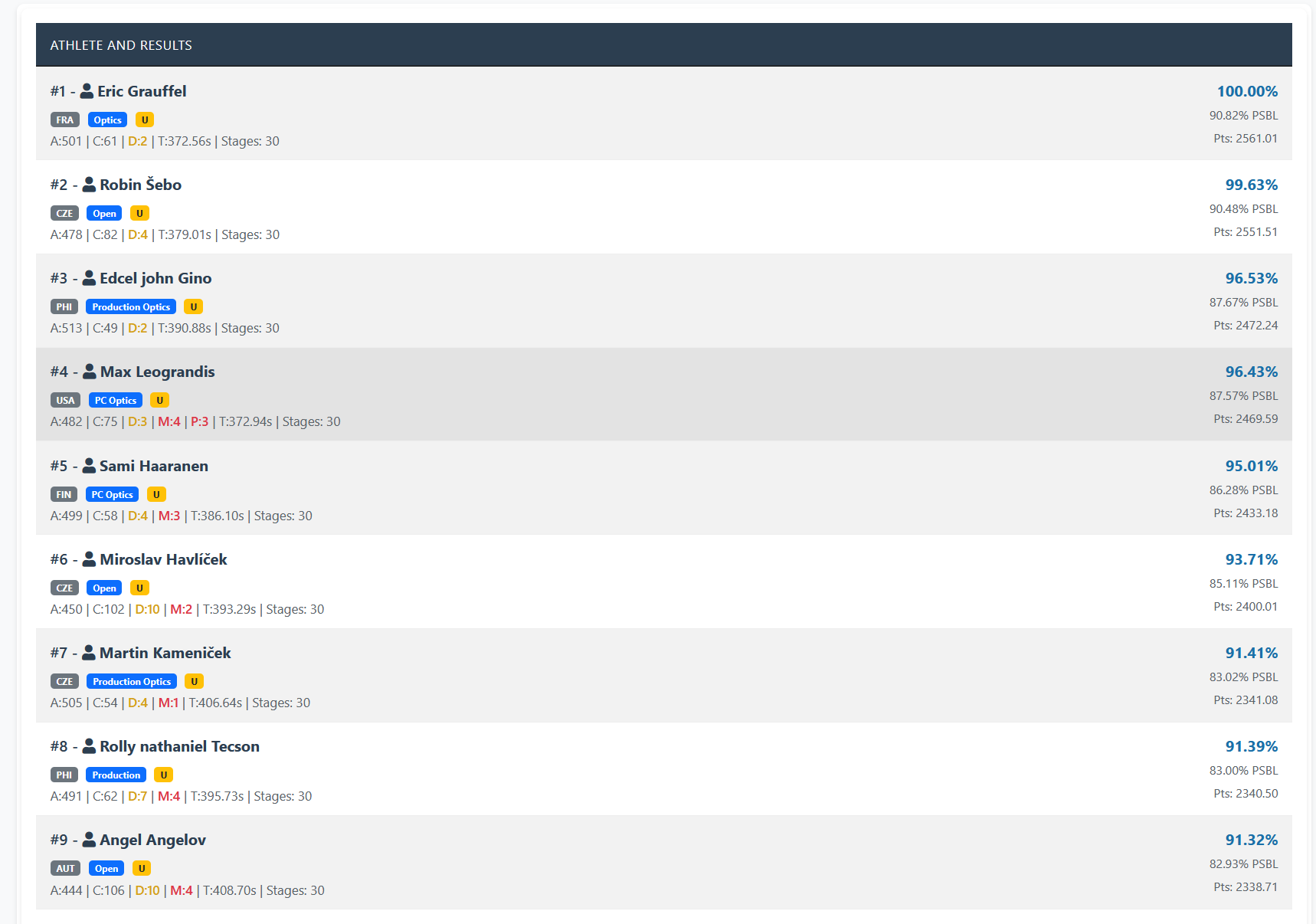
Combined results
Complete table with athletes, division, hits, time, % and points — consolidated view of the race.
Combined results
Complete table with athletes, division, hits, time, % and points — consolidated view of the race.
Combined results
Complete table with athletes, division, hits, time, % and points — consolidated view of the race.
Tools on the IM hub
Direct links to im.scoring.services — match list, import, athlete search, editors, and more.
All hub features
Each card opens a dedicated area of the import and analysis hub.
Division statistics
Compare averages and distributions within the same IPSC division.
Athletes by divisionPlatform statistics
Distribution by division, state, match level and macro view of imported data.
Open platform statsIPSC Stage Designer
Draw stages in the browser — WSB, PDF, materials and RO link.
Open Stage DesignerExplore more in the IPSC guide
Frequently asked questions
Apoiadores


