Language: Português (BR) · Español
Details of the athlete's performance in each IPSC event
The platform provides more detailed and classified performance information to support technical reading and the athlete's evolution.
detalhes desempenho atleta ipsc hub da prova ipsc benchmark atleta ipsc
Test now in the test hub
Open a test, click on the athlete's name and validate the new classified performance details.
Quick actions
Jump straight to import tools and related guides.
What you get on this page
- Detailed performance data per athlete within the race.
- Simple access by athlete's name in the combined, overall or search in the hub.
- Available for all tests in the system.
- Adaptive comparative reference (benchmark) for tests with or without class.
Quick summary
- Detailed performance data per athlete within the race.
- Simple access by athlete's name in the combined, overall or search in the hub.
- Available for all tests in the system.
- See the sections below and the shortcuts to apply to your test or transmission.
How to access athlete details
In the race hub, click on the athlete's name in the combined, overall or athlete search views. The system opens the detailed reading with classification of performance items.
Complete system coverage
This data is available for all tests already present on the platform, guaranteeing standard analysis even in different result structure scenarios.
Logic for classless proofs
When the test does not have a defined class, the comparison uses adaptive logic: reference by top 10 or by competitive neighborhood group (5 above and 5 below). This improves context and fairness of the reading.
Practical value for athlete and coach
With the detailed classification of performance items, it becomes clearer to identify bottlenecks, validate consistency and prioritize technical adjustments for the next tests.
Continue in the Scoring Services ecosystem
This article is part of /guia-ipsc. To apply it in practice, open a test at https://im.scoring.services/list or follow the steps at /matches. Recreational athletes can start with the comprehensive guide at /tiro-practico-guide-completo.
Athlete graphic analysis
Time and points graphs vs best in division; stacked hits and position per stage.
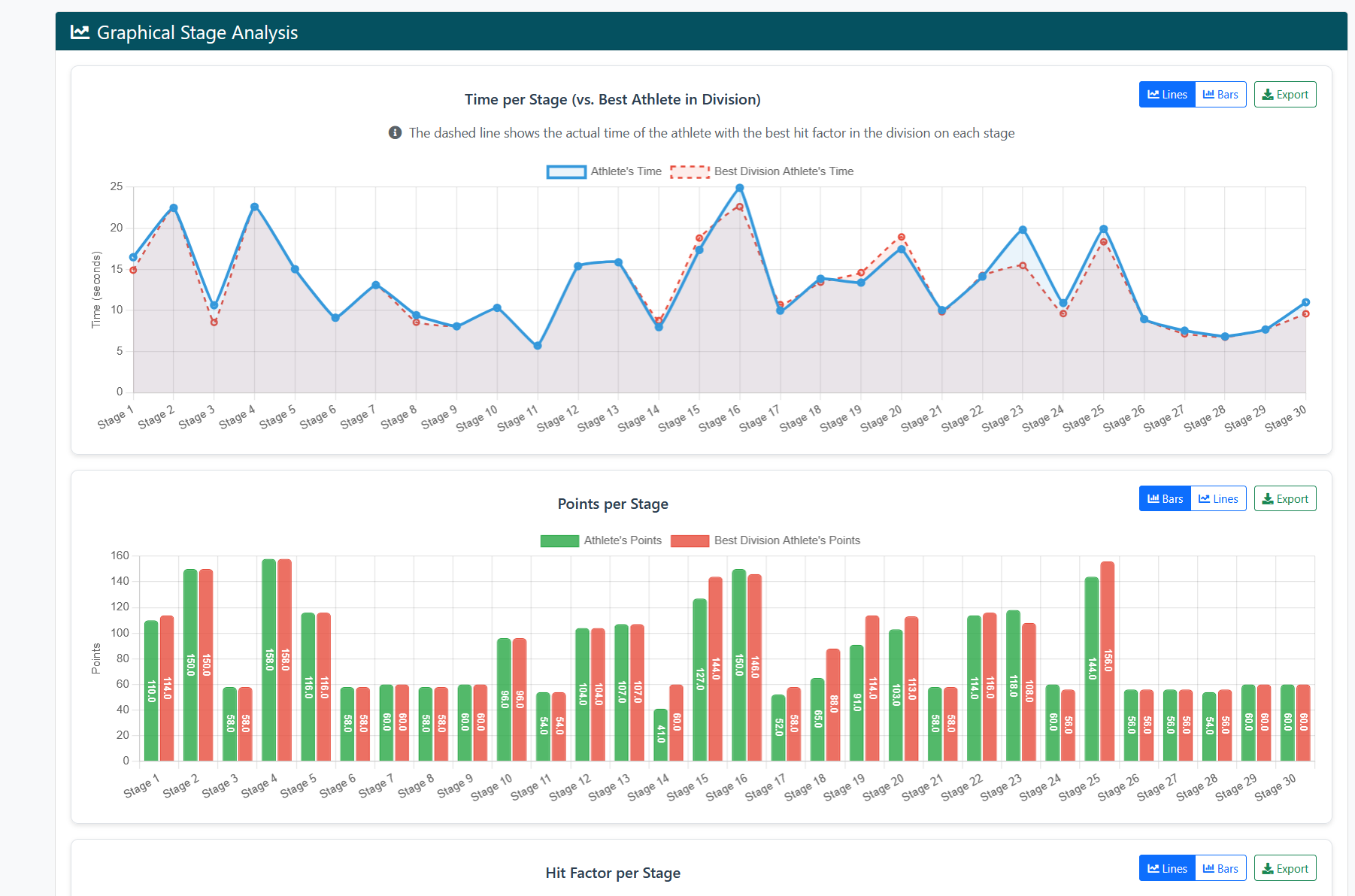
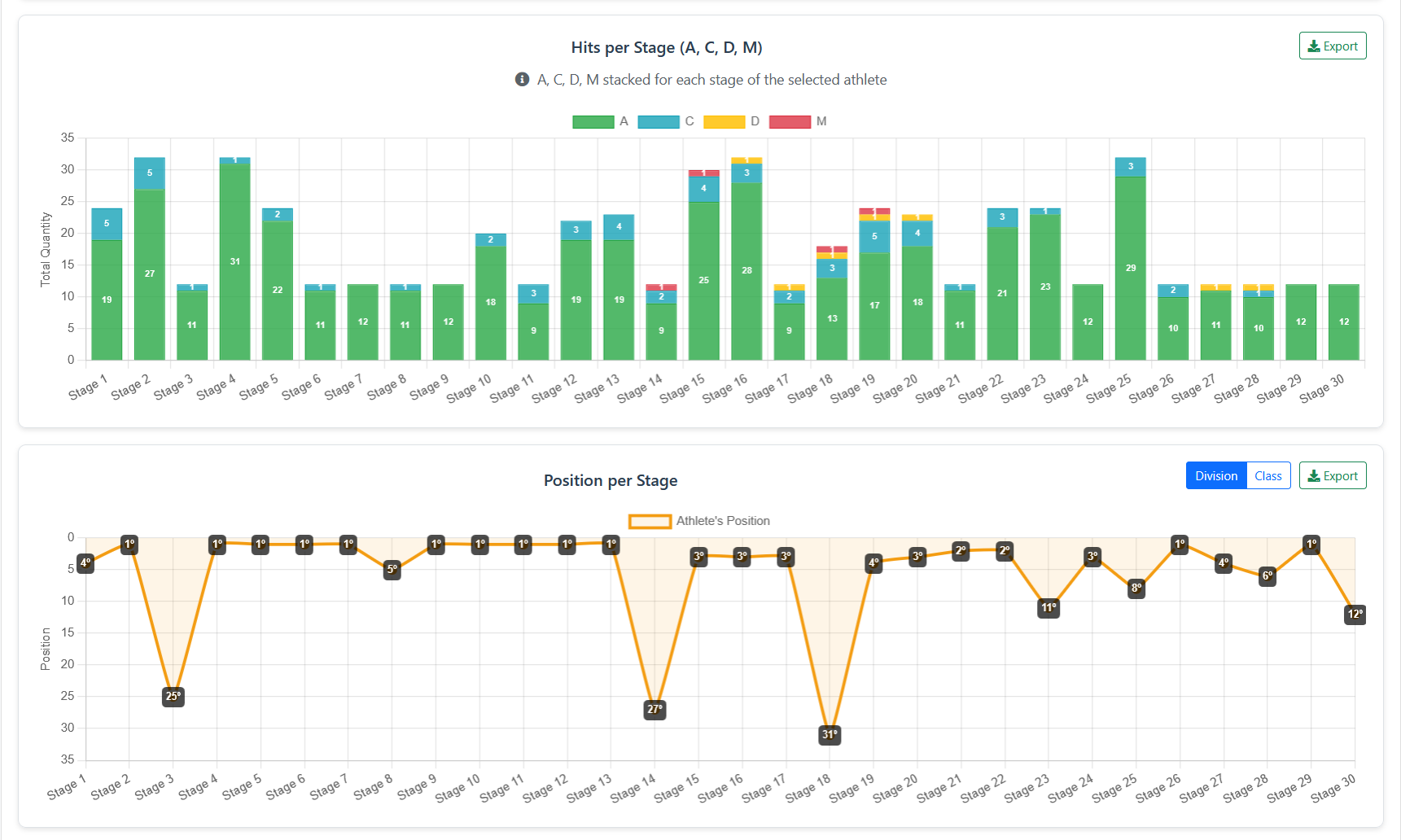
Athlete graphic analysis
Time and points graphs vs best in division; stacked hits and position per stage.
Athlete graphic analysis
Time and points graphs vs best in division; stacked hits and position per stage.
Athlete graphic analysis
Time and points graphs vs best in division; stacked hits and position per stage.
Tools on the IM hub
Direct links to im.scoring.services — match list, import, athlete search, editors, and more.
All hub features
Each card opens a dedicated area of the import and analysis hub.
Division statistics
Compare averages and distributions within the same IPSC division.
Athletes by divisionPlatform statistics
Distribution by division, state, match level and macro view of imported data.
Open platform statsIPSC Stage Designer
Draw stages in the browser — WSB, PDF, materials and RO link.
Open Stage DesignerExplore more in the IPSC guide
Frequently asked questions
Apoiadores


