Language: Português (BR) · Español
IPSC athlete details with full context
Follow the athlete's individual performance, track by track, with technical reading for continuous evolution.
detalhes do atleta ipsc análise atleta na prova desempenho por stage
Search for athlete in the IM hub
Find the athlete and open their profile in the race to see track-by-track performance.
Quick actions
Jump straight to import tools and related guides.
Or enter the list of tests
Open the competition hub and use the built-in athlete search.
Go to list of testsWhat you get on this page
- Individual summary per test.
- Comparison of the athlete with peers in the division.
- Basis for realistic improvement goals.
Quick summary
- Individual summary per test.
- Comparison of the athlete with peers in the division.
- Basis for realistic improvement goals.
- See the sections below and the shortcuts to apply to your test or transmission.
Test performance profile
The individual view allows you to understand regularity, performance peaks and drops by type of stage throughout the event.
Comparison with suitable reference
When crossing paths with athletes from the same division and category, the analysis becomes objective and oriented towards technical progress.
Evolution planning
Use athlete details to set short-term goals and review results with each new race.
Continue in the Scoring Services ecosystem
This article is part of /guia-ipsc. To apply it in practice, open a test at https://im.scoring.services/list or follow the steps at /matches. Recreational athletes can start with the comprehensive guide at /tiro-practico-guide-completo.
Next step after details
Cross with /best-pistas-ipsc and /athletes-per-pista-ipsc. Search the athlete at https://im.scoring.services/atleta for history.
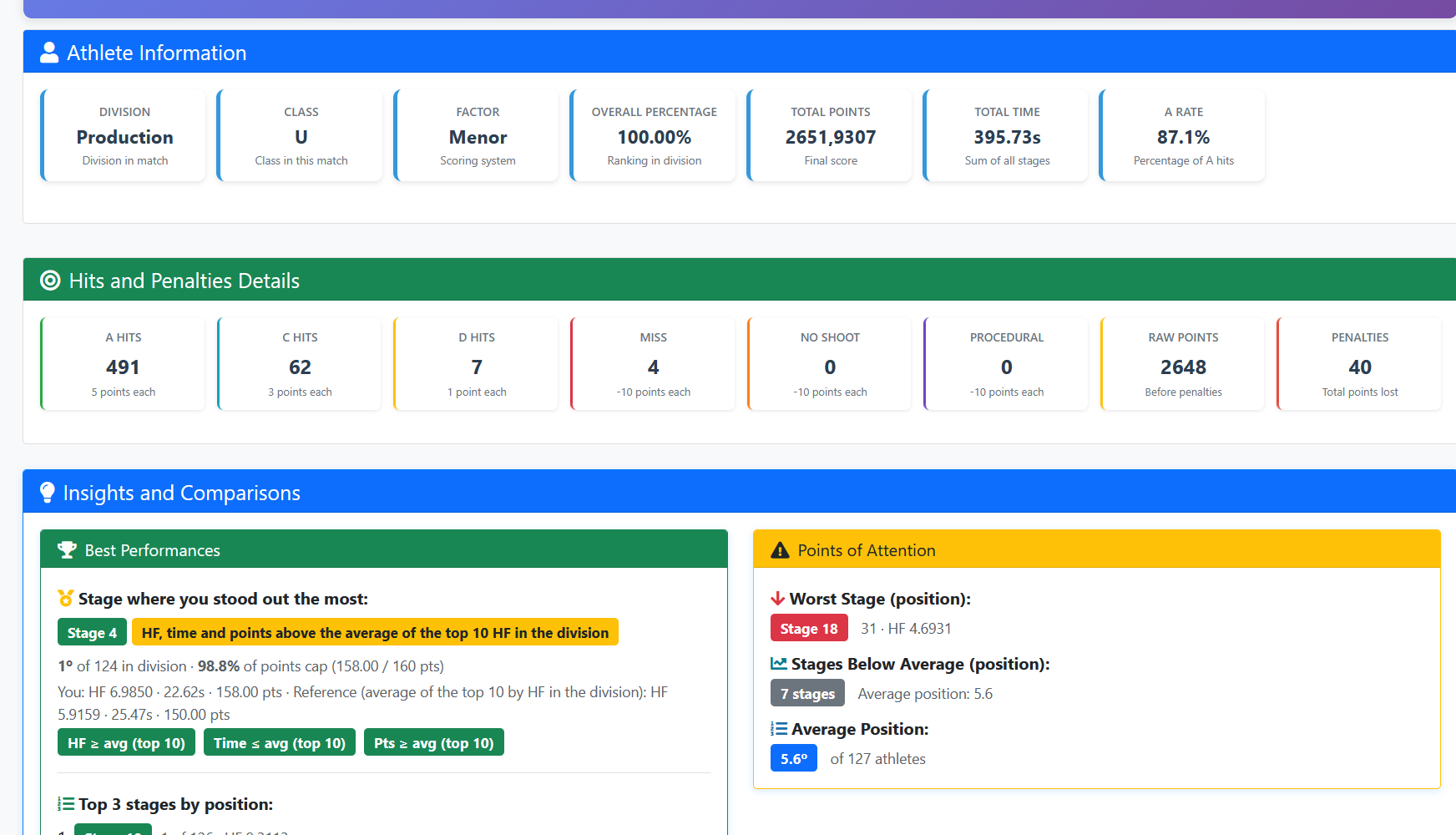
Athlete panel at the race
Summary of division, factor, points, hits and best/worst stage insights.
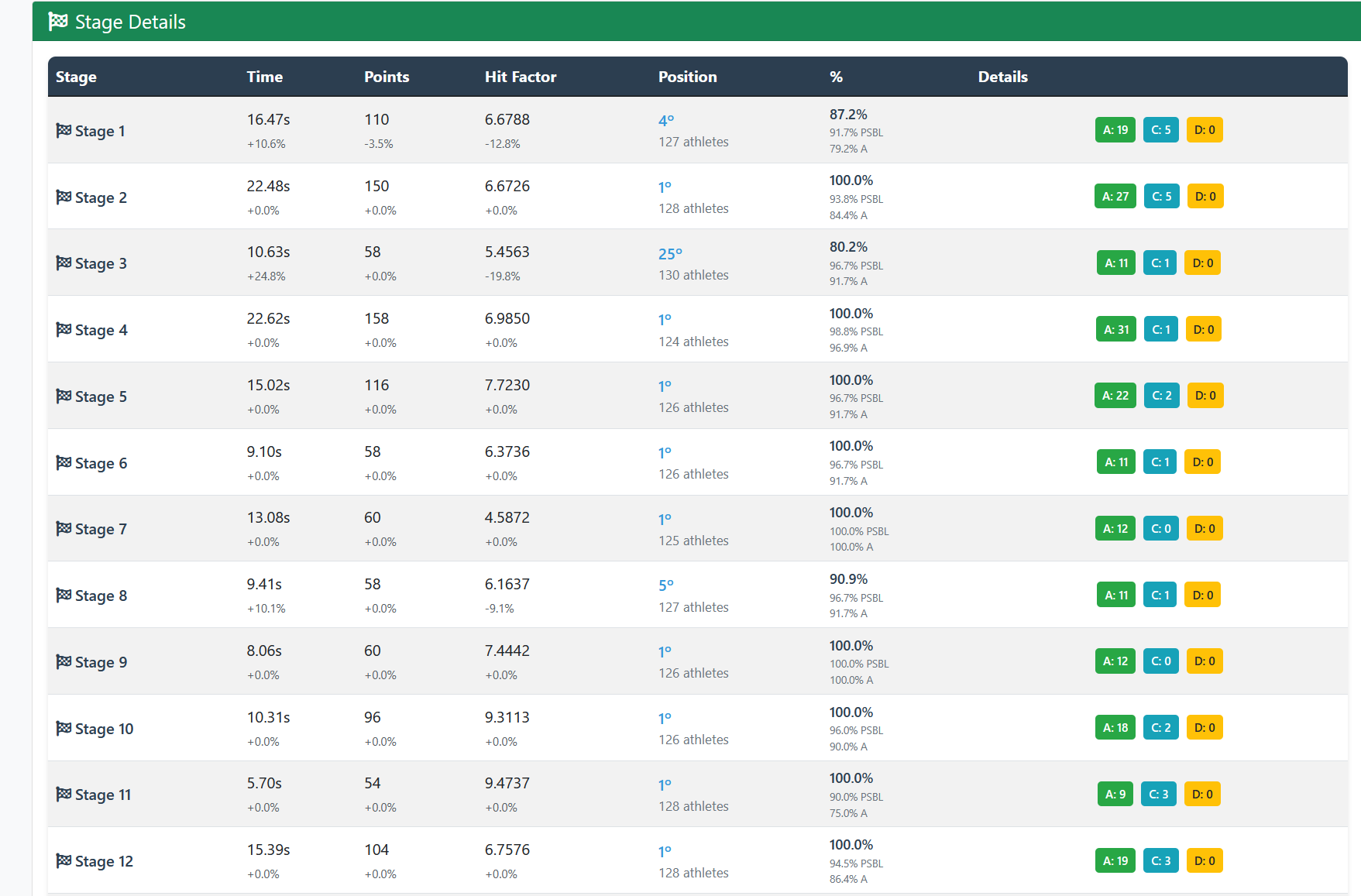
Track-by-track details
Stage table with time, points, HF, position and A/C/D breakdown.
Athlete panel at the race
Summary of division, factor, points, hits and best/worst stage insights.
Track-by-track details
Stage table with time, points, HF, position and A/C/D breakdown.
Athlete panel at the race
Summary of division, factor, points, hits and best/worst stage insights.
Track-by-track details
Stage table with time, points, HF, position and A/C/D breakdown.
Athlete panel at the race
Summary of division, factor, points, hits and best/worst stage insights.
Track-by-track details
Stage table with time, points, HF, position and A/C/D breakdown.
Tools on the IM hub
Direct links to im.scoring.services — match list, import, athlete search, editors, and more.
All hub features
Each card opens a dedicated area of the import and analysis hub.
Division statistics
Compare averages and distributions within the same IPSC division.
Athletes by divisionPlatform statistics
Distribution by division, state, match level and macro view of imported data.
Open platform statsIPSC Stage Designer
Draw stages in the browser — WSB, PDF, materials and RO link.
Open Stage DesignerExplore more in the IPSC guide
Frequently asked questions
Apoiadores


