Language: Português (BR) · Español

IPSC radar graph for competitive profile reading

The radar chart transforms several indicators into a single view of the athlete's profile, facilitating technical comparison.

gráfico radar ipsc perfil comparativo atleta média hit factor

IPSC Analysis Guide

See how to combine graphs, heatmaps and comparisons in the editorial flow of this site.

Quick actions

Jump straight to import tools and related guides.

Radar in the race hub

The radar is on the comparative graphs after selecting the race and athletes.

Go to evidence hub

Comparative

Generate the radar in the hub.

Comparative athletes

Correlation

Time × points.

Correlation

What you get on this page

  • Visual performance profile in multiple dimensions.
  • Clear comparison between consistency and peak performance.
  • Quick read for athletes and coaches.

Quick summary

  • Visual performance profile in multiple dimensions.
  • Clear comparison between consistency and peak performance.
  • Quick read for athletes and coaches.
  • See the sections below and the shortcuts to apply to your test or transmission.

What the radar shows in practice

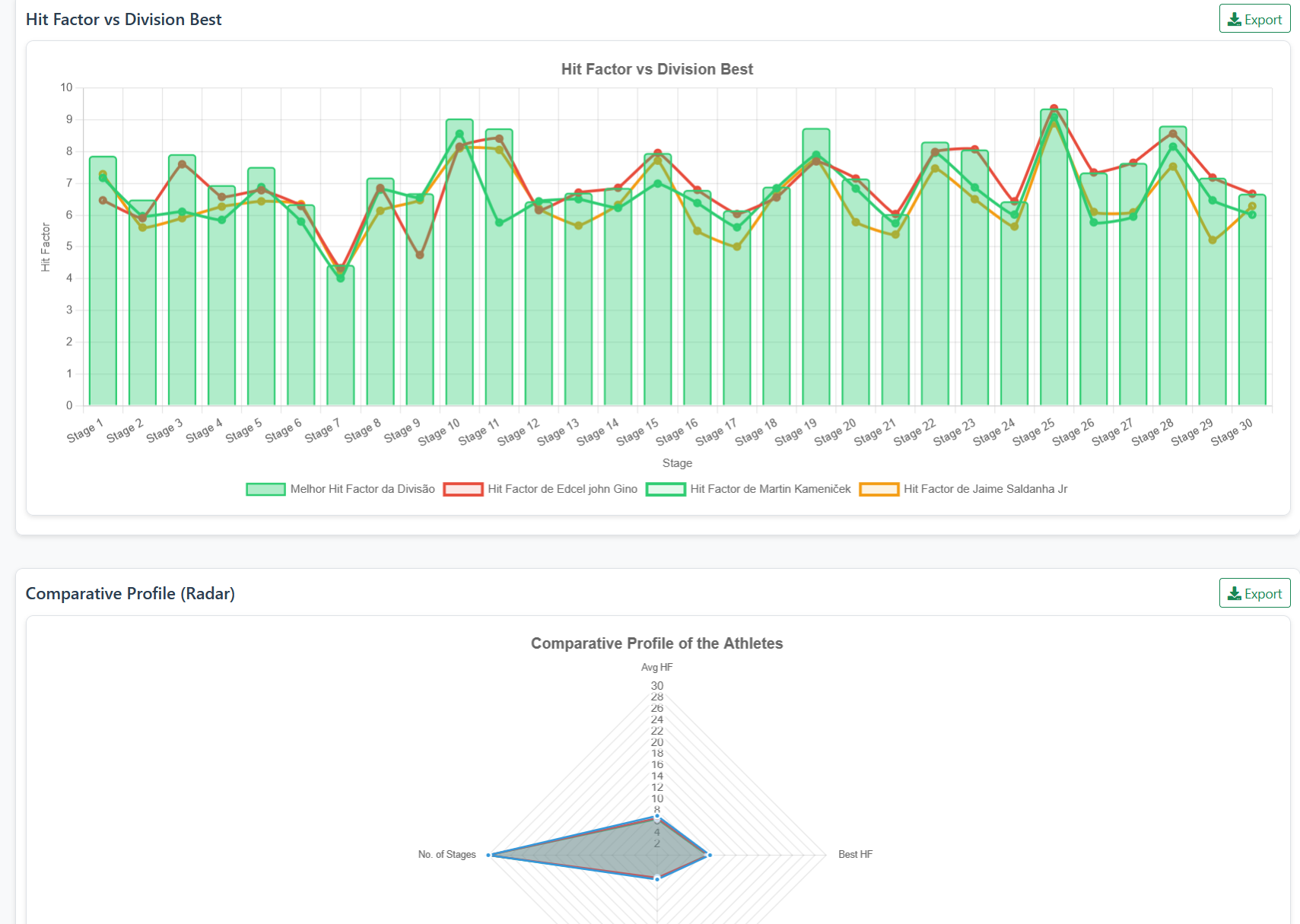
The radar graph aggregates, on different axes, the average hit factor (HF), best and worst HF between tracks and the number of stages — useful to see at a glance whether the athlete is stable (“closed” polygon) or depends on peaks in a few tracks (irregular shape). HF is points divided by time on the track, using the same criteria as the regulations applied to the race.

How to turn radar into action

Use the radar to identify imbalances: athlete with strong peaks and low consistency, or regular athlete without technical ceiling gain.

Practical value for evolution

Radar reading helps the athlete quickly identify performance patterns and prioritize adjustments based on real race data.

Continue in the Scoring Services ecosystem

This article is part of /guia-ipsc. To apply it in practice, open a test at https://im.scoring.services/list or follow the steps at /matches. Recreational athletes can start with the comprehensive guide at /tiro-practico-guide-completo.

Interpret the polygon

Irregular shape = dependence on few tracks; balanced polygon = consistency. Combine with /analise-correlacao-ipsc.

Select athletes and compare hit factor, time and points — bars, lines and radar profile.
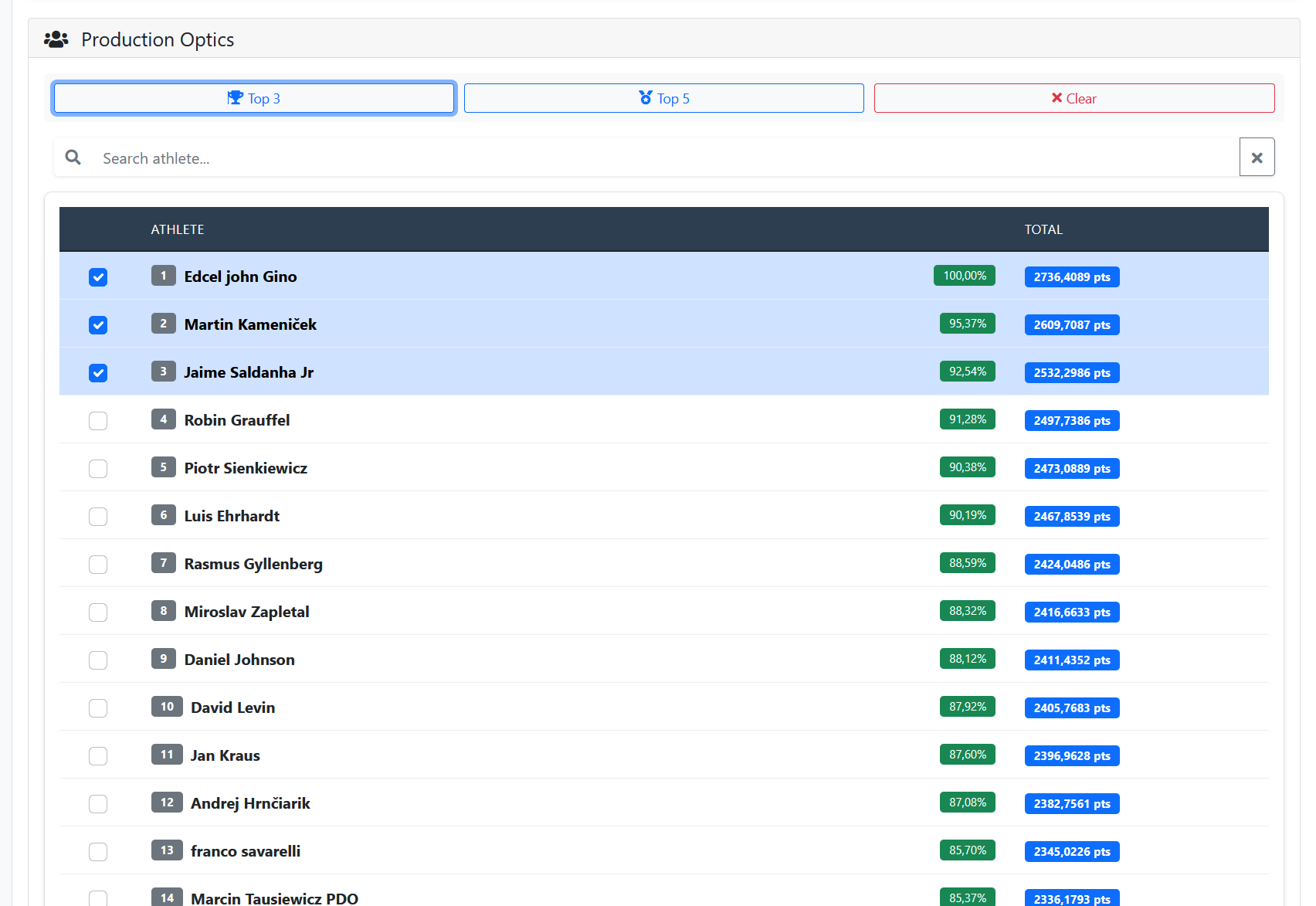
Production Optics table with Top 3 selection and percentages
Choose athletes by division (Top 3/5) to feed the comparative graphs.
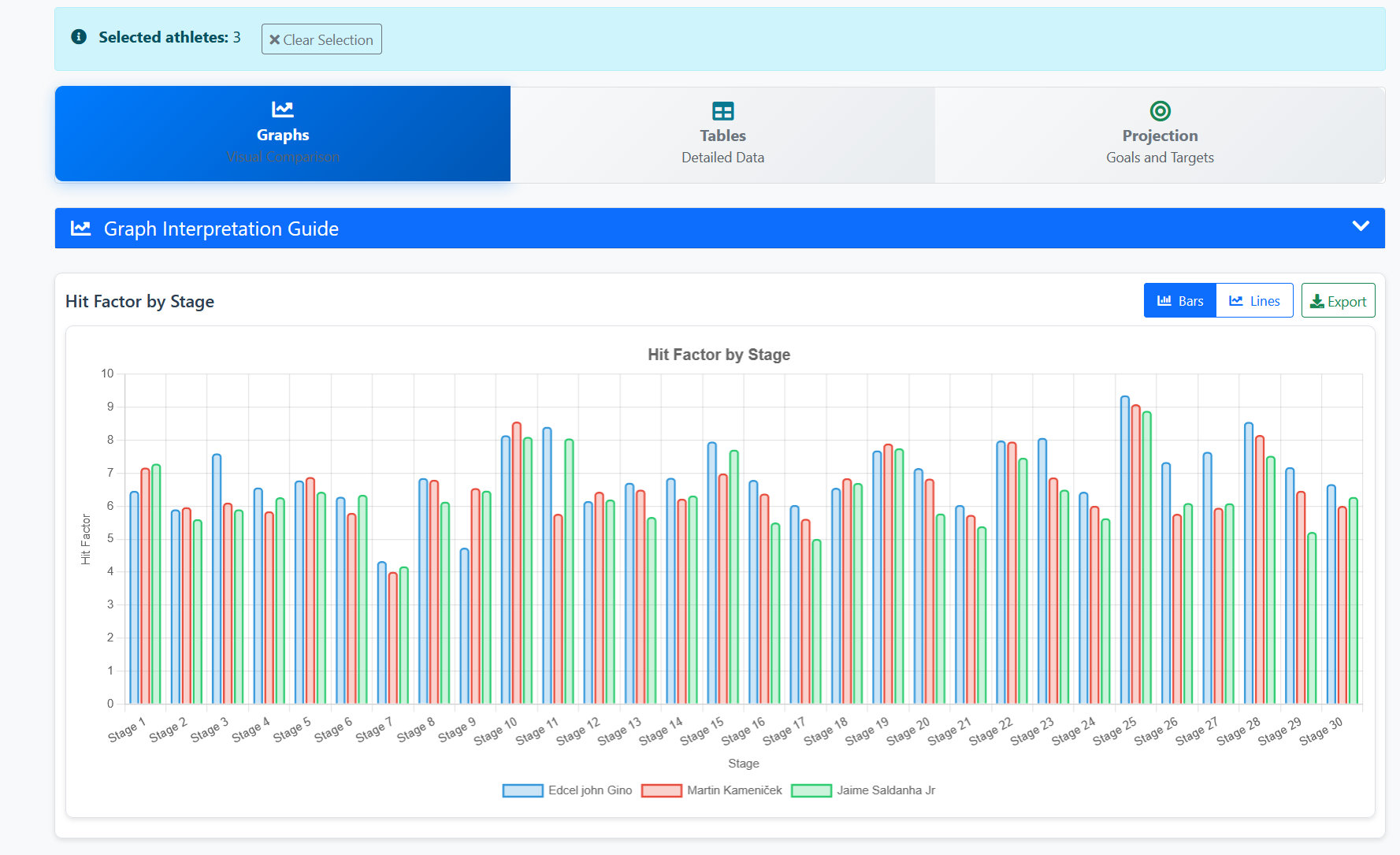
Hit Factor by Stage chart with three selected athletes
Bars grouped by stage — compare HF of up to 4 athletes in the same event.
Hit Factor vs best in division and comparative radar profile
Lines vs best HF in the division and radar with average HF, best HF and number of stages.
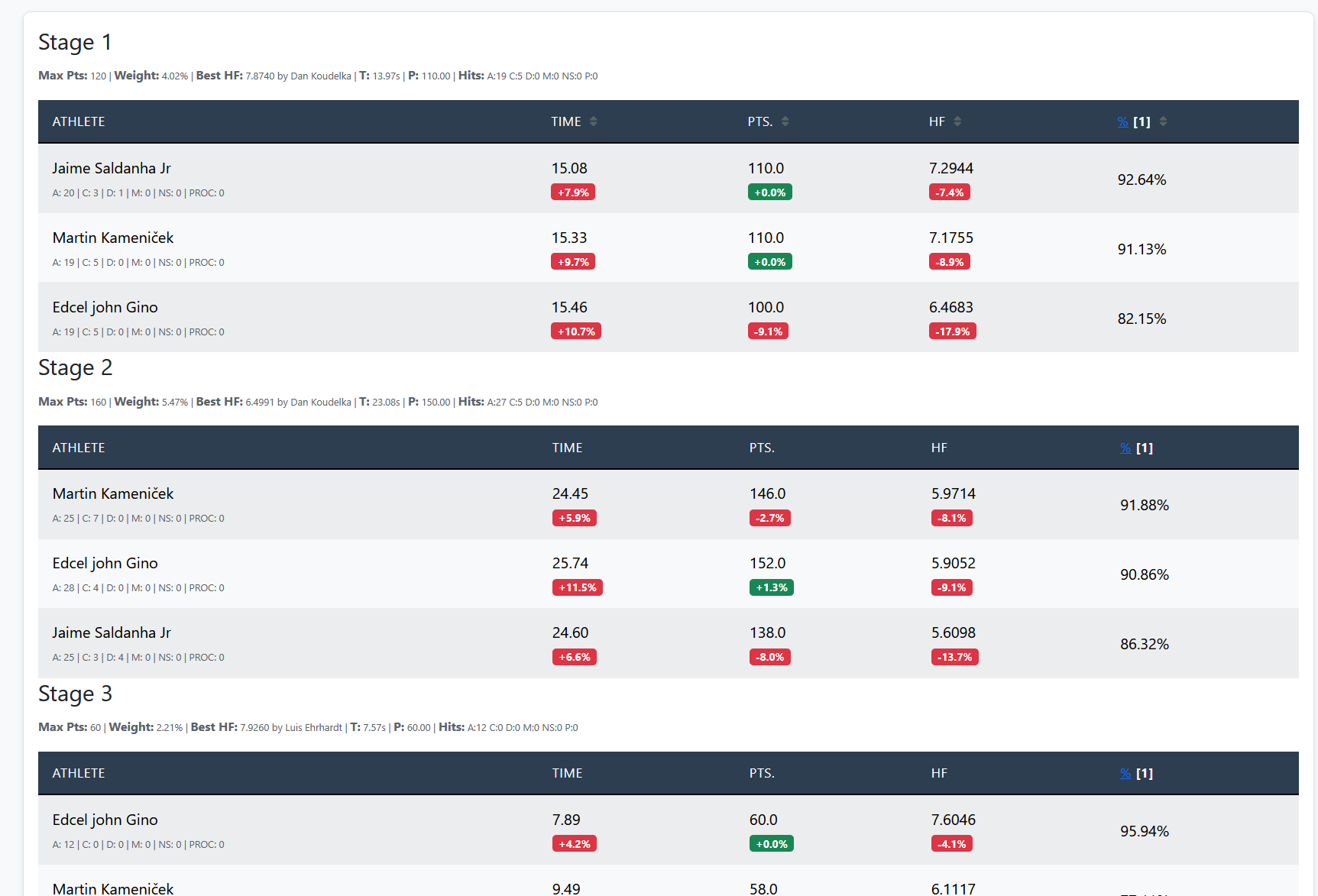
Detailed tables by Stage 1, 2 and 3 with A/C/D/M
Track-by-track detail: time, points, HF, % and breakdown of hits with comparative badges.
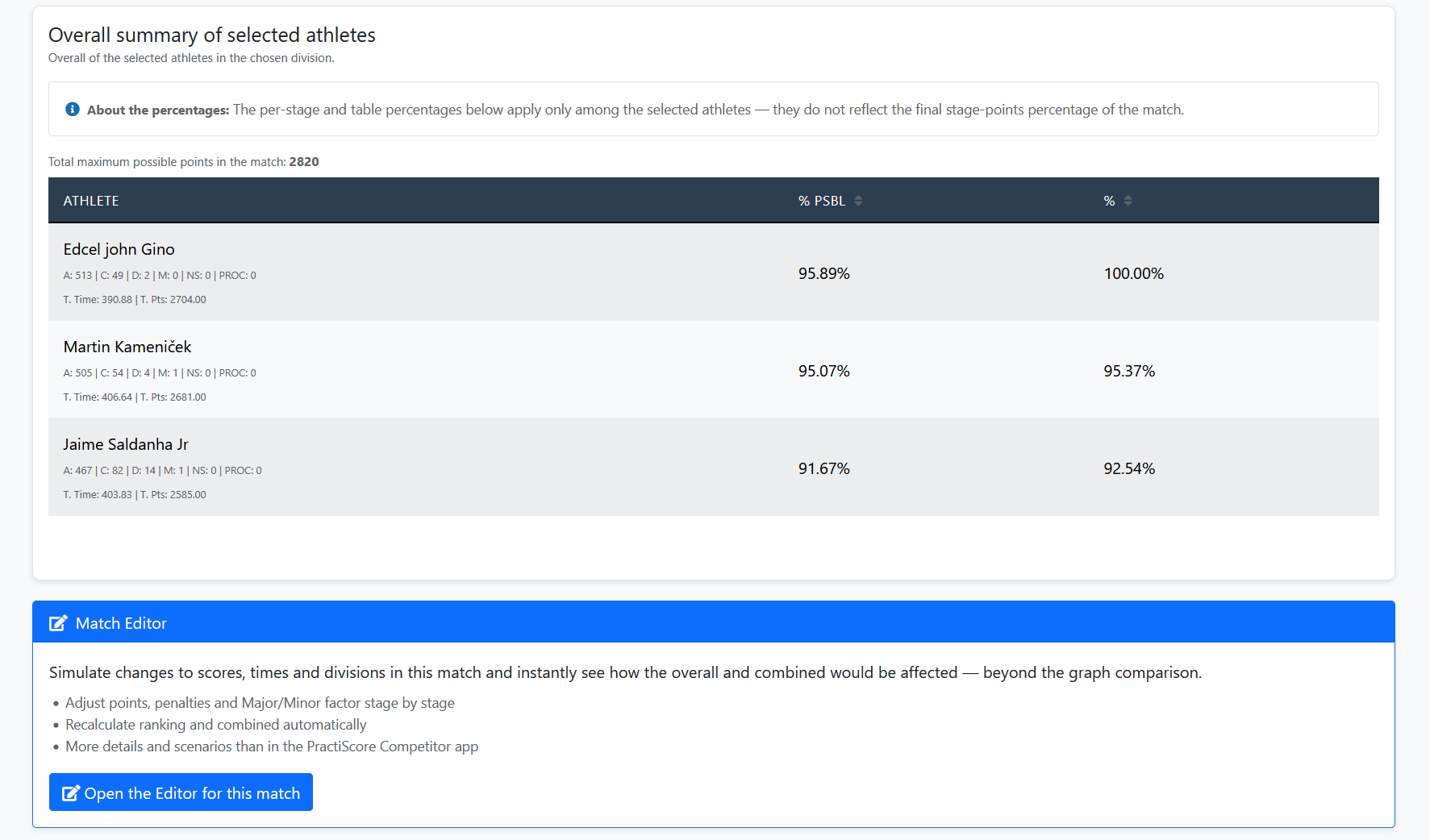
Overall summary of those selected and shortcut to Match Editor
Consolidated table between chosen athletes and link to simulate scenarios in the editor.

Select athletes and compare hit factor, time and points — bars, lines and radar profile.
Production Optics table with Top 3 selection and percentages
Choose athletes by division (Top 3/5) to feed the comparative graphs.
Hit Factor by Stage chart with three selected athletes
Bars grouped by stage — compare HF of up to 4 athletes in the same event.
Hit Factor vs best in division and comparative radar profile
Lines vs best HF in the division and radar with average HF, best HF and number of stages.
Detailed tables by Stage 1, 2 and 3 with A/C/D/M
Track-by-track detail: time, points, HF, % and breakdown of hits with comparative badges.
Overall summary of those selected and shortcut to Match Editor
Consolidated table between chosen athletes and link to simulate scenarios in the editor.

Select athletes and compare hit factor, time and points — bars, lines and radar profile.
Production Optics table with Top 3 selection and percentages
Choose athletes by division (Top 3/5) to feed the comparative graphs.
Hit Factor by Stage chart with three selected athletes
Bars grouped by stage — compare HF of up to 4 athletes in the same event.
Hit Factor vs best in division and comparative radar profile
Lines vs best HF in the division and radar with average HF, best HF and number of stages.
Detailed tables by Stage 1, 2 and 3 with A/C/D/M
Track-by-track detail: time, points, HF, % and breakdown of hits with comparative badges.
Overall summary of those selected and shortcut to Match Editor
Consolidated table between chosen athletes and link to simulate scenarios in the editor.

Select athletes and compare hit factor, time and points — bars, lines and radar profile.
Production Optics table with Top 3 selection and percentages
Choose athletes by division (Top 3/5) to feed the comparative graphs.
Hit Factor by Stage chart with three selected athletes
Bars grouped by stage — compare HF of up to 4 athletes in the same event.
Hit Factor vs best in division and comparative radar profile
Lines vs best HF in the division and radar with average HF, best HF and number of stages.
Detailed tables by Stage 1, 2 and 3 with A/C/D/M
Track-by-track detail: time, points, HF, % and breakdown of hits with comparative badges.
Overall summary of those selected and shortcut to Match Editor
Consolidated table between chosen athletes and link to simulate scenarios in the editor.

Tools on the IM hub

Direct links to im.scoring.services — match list, import, athlete search, editors, and more.

All hub features

Each card opens a dedicated area of the import and analysis hub.

Select match

Quickly find the right match in the results hub.

Open match list

Import and reprocess

Start import and keep data consistent for analysis.

Import my match

Analyze athlete

Search athletes and browse history and performance slices.

Find athlete

Division statistics

Compare averages and distributions within the same IPSC division.

Athletes by division

Platform statistics

Distribution by division, state, match level and macro view of imported data.

Open platform stats

Club directory

Filters and search for shooting clubs in the import hub.

Open shooting clubs

Simulate scenarios

Use the editor to validate impact of score changes.

Open editor

Division editor

Review and test division scenarios after the match.

Open division editor

Athlete training

Log sessions, stages and runs outside imported matches.

Open training

IPSC Stage Designer

Draw stages in the browser — WSB, PDF, materials and RO link.

Open Stage Designer

Explore more in the IPSC guide

Frequently asked questions

No. Radar summarizes profile; analysis by stage deepens the diagnosis.

Athletes, coaches and organizers who need to quickly compare profiles.

In the graphics tab within the athlete comparison in the race hub.

No. It summarizes dimensions for quick comparison; numerical details are located in /details-atleta-ipsc and /dados-por-stages-ipsc.

The comparative profile uses average hit factor, best HF, worst HF and athlete's number of tracks — useful for comparing consistency between competitors. Complete comparison at /comparativo-atletas-ipsc.

Apoiadores